Closing vs. Deleting Matters in Eve
Last updated: September 30, 2026
Overview
There are two ways to take a matter off the active list. Closing archives it and keeps everything. Deleting removes it and everything in it, permanently. Close unless there is a specific reason to delete. A closed matter can be reopened; a deleted one cannot be recovered by anyone, including Eve support.
Closing a Matter
A closed matter leaves the active matters list and moves to the Closed tab. Documents, chat history, drafts, and case information all stay intact. To close a matter, select the ellipses to the far right of the matter's title on the Matters page.
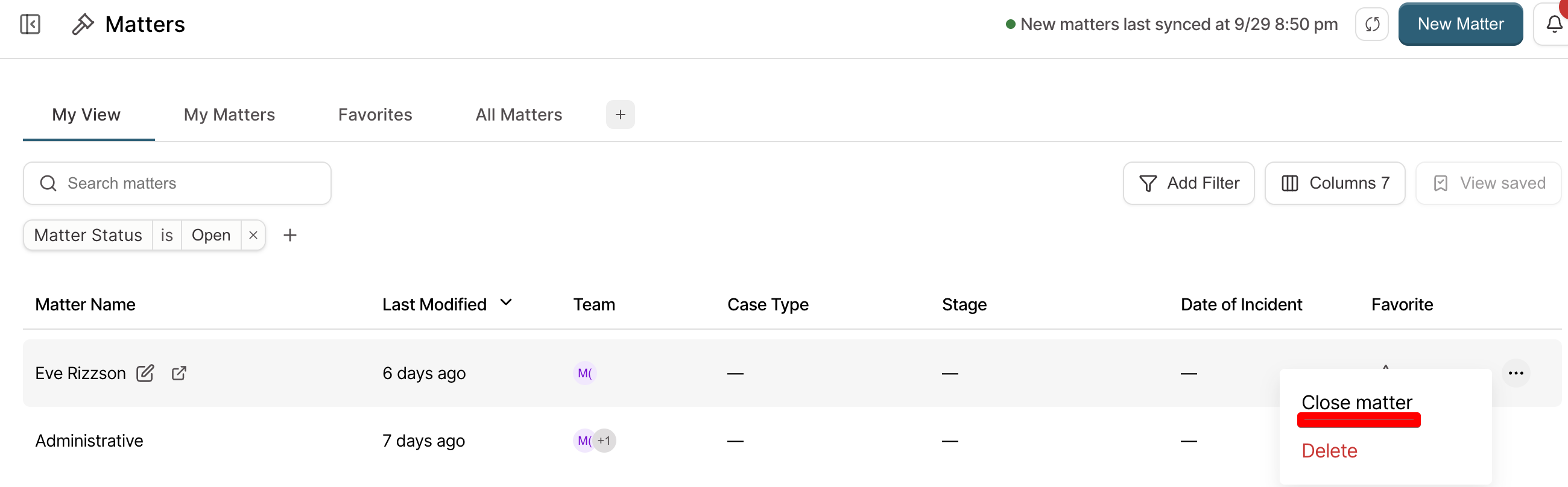
It can be reopened at any point from the Closed filter by clicking the same ellipses, and selecting Reopen Matter.
Deleting a Matter
Deleting permanently removes the matter and everything attached to it: documents, conversation history, drafts, and case information. There is no recovery, no undo, and no restoring it from a backup. In addition, a matter with an invoice generated for it cannot be deleted.
Matters are typically only deleted in Eve when a duplicate matter has been opened by mistake. If you need to delete a matter, please reach out to your Customer success manager.
Which One to Use
Case finished. Close. The file stays available for a later question, an audit, or a related matter.
Duplicate, test, or pilot matter. Deleting is what keeps these off the contract count, which is the usual reason to delete at all. See 📄 In-Product Billing.
Unsure. Close. Closing is reversible and deleting is not.
What Neither One Does
Closing does not remove anything from the connected system. The case in the case management system is unaffected either way.
Closing does not hide the matter from Firm Admins. It stays visible in the Closed tab.
Key Terms
Closed matter: An archived matter, off the active list, with all data intact and reopenable.
Deleted matter: A matter permanently removed with all its data, with no recovery.
Closed tab: Where archived matters are held and reopened from.