Correcting a Value in Atlas
Last updated: August 25, 2026
Overview
Atlas fills in case fields automatically, which means nobody has to approve every fact before it shows up. It also means you'll occasionally find a value that's wrong, or a record that shouldn't be there at all.
Correcting it takes a few seconds, and it does two things: it fixes your case file, and it tells Eve exactly where extraction needs work. Corrections are the single most useful feedback your firm can give while Atlas is still learning your documents.
Before You Correct: Check the Source
A value that looks wrong is sometimes a document you hadn't seen yet. Before you change anything, look at where it came from.
On Matter Overview, hover over a field from Atlas to reveal the sources icon. Hover over it to open the Latest sources box, which lists the document or documents behind the field's current value. Click a source and it opens in a matter tab, so you can read the passage the value came from.
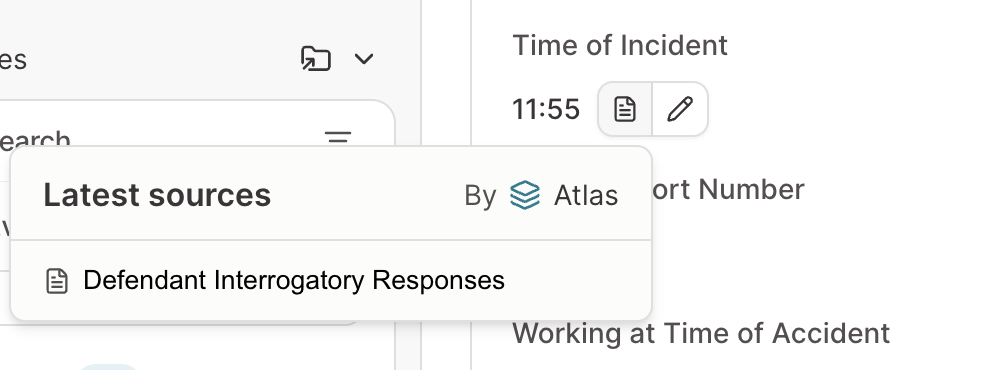
If the source supports the value, you've just saved yourself a correction. If it doesn't, you've got exactly what Eve needs to hear about.
Correcting a Field
Matter-level fields are editable in place on Matter Overview — click the field, enter the right value, done. No modal, no approval step.
Once you do, your entry is the value your team and Eve see. Atlas keeps its own extracted value and the supporting evidence alongside yours rather than replacing it, so nothing is lost on either side and Eve can still tell that its extraction disagreed with a person.
One side effect worth expecting: a value you typed doesn't trace back to a document, because it didn't come from one. Corrected fields won't carry a document citation the way extracted ones do.
When to Remove Instead of Correct
Some values shouldn't be edited to something better — they shouldn't exist. Case files hold plenty of documents that aren't sources of case fact: long email chains, discovery productions, court filings. Atlas can occasionally pull a value out of one of them.
The two common potentials to watch for:
A party who only appears in an email thread — named in correspondence, not actually a party to the case
A number read as the wrong kind of number — a limit mentioned in a court filing landing in a lien field, for example
When you see one, remove the value rather than correcting it. Eve is actively improving how Atlas filters these documents, and a removal tells us precisely which ones it's still misreading.
What Atlas Does When Sources Disagree
When two documents support different values, Atlas doesn't average them or invent a blended answer. It picks the value with the best support, weighted toward the more recent source, and keeps the evidence for what it chose. So a field that changed on its own usually means a newer document arrived and disagreed with an older one — and the sources will show you which.
Timing: Give It an Hour
Corrections apply immediately. New extraction doesn't. Fields populate up to about an hour after a document is processed, and data from a connected case management system refreshes overnight. If a value is missing rather than wrong, check the timing before treating it as an error!